IceOnlys Blog
All Around Microsoft Dynamics Business Central
BusinessCraft: Item Images with MediaSet
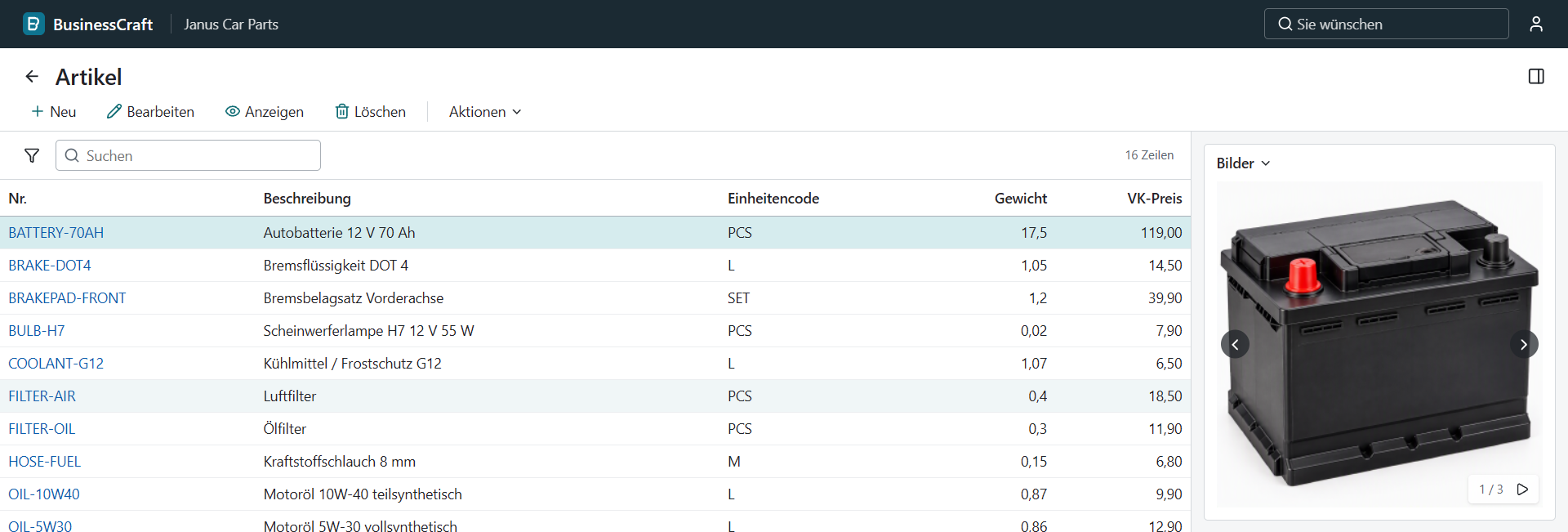
Business Central has a data type for more than one image per record: MediaSet. The item's Picture field is one. In practice, an item in BC still has exactly one picture. In BusinessCraft, an item can now have as many images as you like, with a carousel in the FactBox and a fullscreen slideshow. MediaSet works the way it was meant to. :)
MediaSet in Business Central
A Media field holds one image. A MediaSet field holds a set of images. That is the whole difference, and it is why Item.Picture is a MediaSet.
But look at the standard Item Picture FactBox. This is what happens when you import a picture:
if Rec.Picture.Count > 0 then
    if not Confirm(OverrideImageQst) then
        Error('');
...
Clear(Rec.Picture);
Rec.Picture.ImportFile(FileName, ClientFileName);
The set is cleared before every import. Take Picture does the same, and Delete clears the whole set. The FactBox shows one image, and there is no way to page through the set. The data type supports many images, but the UI only ever uses one.
The AL side
In the BusinessCraft base app, the item got a MediaSet field:
field(10; Images; MediaSet)
{
    Caption = 'Images';
    ToolTip = 'Specifies the images of the item.';
}
And a new FactBox, Item Images FactBox, on the item card and the item list. The upload action does not clear anything. It adds the new image to the set:
local procedure UploadImageFromFile()
var
    ImageInStream: InStream;
    FileName: Text;
begin
    Rec.TestField("No.");
    if not UploadIntoStream(SelectImageLbl, '', ImageFileFilterLbl, FileName, ImageInStream) then
        exit;

    Rec.Images.ImportStream(ImageInStream, FileName);
    Rec.Modify();
    CurrPage.Update(false);
end;
That's it. Upload a second image, and the item has two.
These Media and MediaSet methods work now:
| Type | Methods |
|---|---|
Media |
MediaId, ImportStream, ImportFile, ExportStream |
MediaSet |
MediaId, Count, Item, Insert, Remove, ImportStream |
Tenant Media
Media fields do not store the image in the record. They store a GUID. The images live in three system tables, with the same IDs as in BC:
| Table | ID | Content |
|---|---|---|
Tenant Media Set |
2000000183 |
Set ID, media ID, and the index of the image in the set |
Tenant Media |
2000000184 |
The image itself as a Blob, plus MIME type, width, and height |
Tenant Media Thumbnails |
2000000185 |
Scaled-down versions of the images |
A MediaSet field points to a set ID. The set points to the media. Insert adds a row with the next index, and Remove deletes the row.
This also needed Blob fields in the database: BLOB in SQLite and varbinary(max) in SQL Server.
Thumbnails
The client never loads a 1.8 MB PNG into a FactBox. It asks for a thumbnail: 70, 240, or 320 pixels. The first request scales the image down and stores the result in Tenant Media Thumbnails. Every later request reads the stored thumbnail.
Images and thumbnails come from their own HTTP endpoints. They only answer to a logged-in user, and since a media ID never changes its content, the browser can cache the response for good.
Permissions
The media tables are normal tables for the permission system from the last post. The BCRAFT DEFAULT set can read them, and BCRAFT ITEM ADMIN can also insert, modify, and delete. A user without write permission can see the images, but not upload new ones.
UploadIntoStream
To get an image into a stream, you need a file from the user. That is UploadIntoStream, and it works like Confirm: the AL call suspends, the client shows a file dialog, and the call continues with the answer.
The browser first sends the file to a temporary upload endpoint and gets an upload ID back. Only that ID goes back to the service tier with the dialog answer, not the file. The service tier then fills the InStream from the temporary upload.
All overloads in use work, with 2, 4, or 5 arguments, including the optional var FileName.
The FactBox
The client got a MediaSet control:
- Arrows on the left and right page through the images.
- The index in the corner shows where you are, like 1 / 3.
- A play button starts a slideshow, one image every three seconds.
- A click on the image opens the original fullscreen, not the thumbnail. The arrow keys page through the set, and Escape closes it.
- The height of the FactBox follows the tallest image of the set, so it does not jump while paging.
Like in BC, the FactBox actions sit in the menu behind the FactBox caption, and the field caption is hidden.
Demo data: Janus Car Parts
Until now, I always tested with my own database. That works for me, but nobody else can start from it, and I could not start over either. Now there is demo data to set up a fresh company at any time: Janus Car Parts, a small car parts dealer.
It is its own app, Janus Car Parts Demo, on top of the sales base app and the customer level extension. An action on the Sales Setup page creates everything in one go:
| What | Content |
|---|---|
| Units of measure | Piece, liter, set, meter, and hour, each with its own precision |
| Items | 15 car parts with inventory, like motor oil, brake pads, and a car battery, plus a workshop service hour |
| Customers | Six workshops and fleets in Germany, the UK, Austria, and Switzerland, each with a customer level |
| Sales documents | Three quotes, three open orders, and three posted invoices |
The demo data only runs in an empty company. If units of measure, items, or customers already exist, it stops with an error.
The nice part: the demo data is a test by itself. It uses a List of [Code[20]] for the customer numbers, CalcDate for the Customer Since date, item ledger entries for the inventory, and Sales Post for the invoices. If one of these breaks in the runtime, the demo data breaks too.
And there are images. The repository has 18 PNGs for the items, ready to upload into the new FactBox. The car battery has three of them.
The rest of the day
Images were the visible part. Most of the commits were about data types:
- Scalar types.
Byte,Char,BigText,SecretText,TextConst, andTextBuilderwork as variables, andBigTextalso as a field.SecretTextnever shows up inFormatorMessage. - Time, Duration, and DateFormula. As fields and as variables. AL literals like
0Tand103045Tparse, and durations accept the BC abbreviations like1T,5min, or1S.DateTimefields get one picker with calendar, hours, and minutes. - List and Dictionary.
List of [T]andDictionary of [K, V], includingforeach. - CaptionClass and AutoFormat. Both run through the
CaptionClassTranslateandAutoFormatTranslateevents. The sales line uses them to show the unit of measure in the quantity caption, and to format the quantity with the precision of the unit. - MultiLine fields. A text area with a maximum height and a scroll bar.
- Errors.
GetLastErrorTextand friends work, the error dialog can copy the details, and the call stack looks like the one in BC. - Last company. BusinessCraft remembers the last company per user in
User Personalization, like BC.
Numbers
- 241 commits, up from 173
- About 72,800 lines of Rust, up from about 61,100
- Three new system tables:
Tenant Media,Tenant Media Set, andTenant Media Thumbnails - One demo company: 16 items, 6 customers, 9 sales documents, and 18 item images
- Still a Cursor Pro subscription for $20 a month
Next: Indirect permissions and more data types
The last post promised indirect permissions. Then the images happened. The test is still open: a user who can only read the item ledger entries should still be able to post a sales order, and must not be able to insert an entry directly.
And more data types. JSON and XML are already in the works: a cloud agent is implementing them while I write this.
I'll keep you updated. :)
BusinessCraft is not affiliated with or endorsed by Microsoft. "Microsoft", "Dynamics 365" and "Business Central" are trademarks of Microsoft Corporation.